
Aqua Trivy is an open source tool for finding security misconfigurations in our cloud environments. With security misconfiguration sitting at position 5 in the current OWASP top 10, having a tool in our arsenal to detect these security flaws is beneficial. We can also introduce Trivy to our deployment pipelines as a quality gate to prevent security misconfigurations reaching our production environments.
Getting started
There are a plethora of options for installation in the official documentation, but if you want to install on Windows the easiest option is using the chocolatey package manager https://community.chocolatey.org/packages/trivy
Scanning an AWS account
Once authenticated with AWS through AWS CLI credentials, we can simply use the following command to scan our AWS account, specifying the relevant region:
trivy aws --region eu-west-1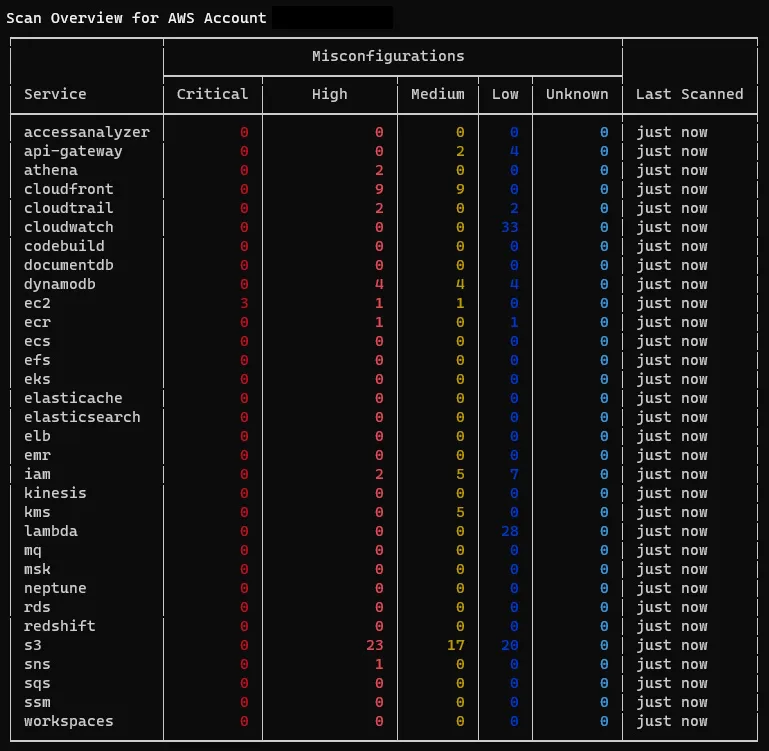
We can see the list of AWS services that have been scanned for security misconfigurations with quantitative data for the associated severity levels. We can dig further into each service to learn more.
A point worth noting is that scan results are cached for a period of 24 hours, this can be overridden using the --update-cache flag.
Scanning a service
Now that we have a high level view of the security misconfigurations within our AWS account, we can investigate further by looking at the AWS services with the highest severity level findings. To scan a particular service we simply pass the name of the service using the --service flag, as S3 is a global service we can use the following command:
trivy aws --service s3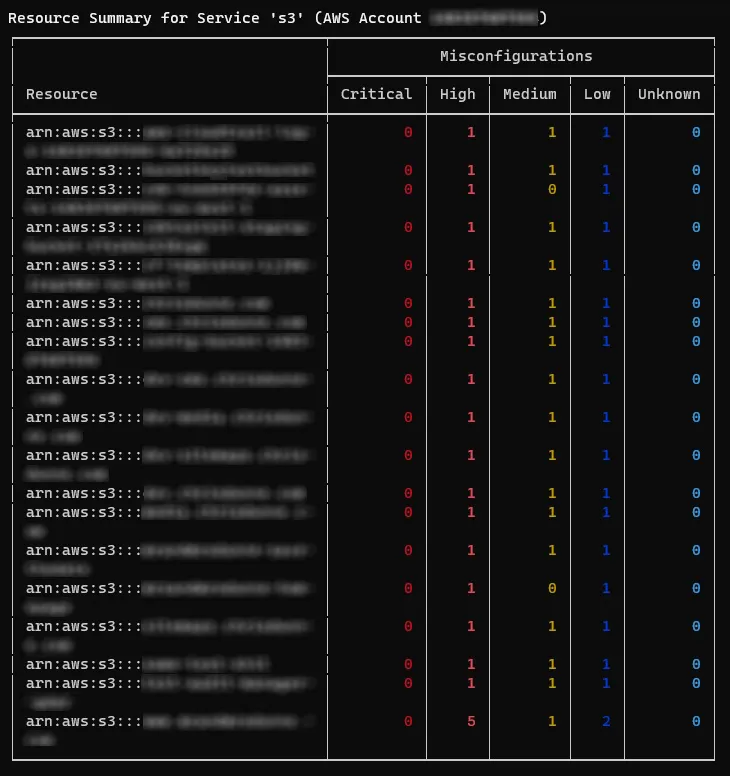
The results and findings displayed in this view further highlight where the main security misconfigurations can be found, as you can see we have one S3 Bucket which stands out due to the number of high severity issues, and as a result we can focus in on that particular instance.
Scanning by ARN
To view the findings of a particular resource we pass the resource ARN from the previous table of results using the --arn flag as follows:
trivy aws --service s3 --arn arn:aws:s3:::bucket-name-here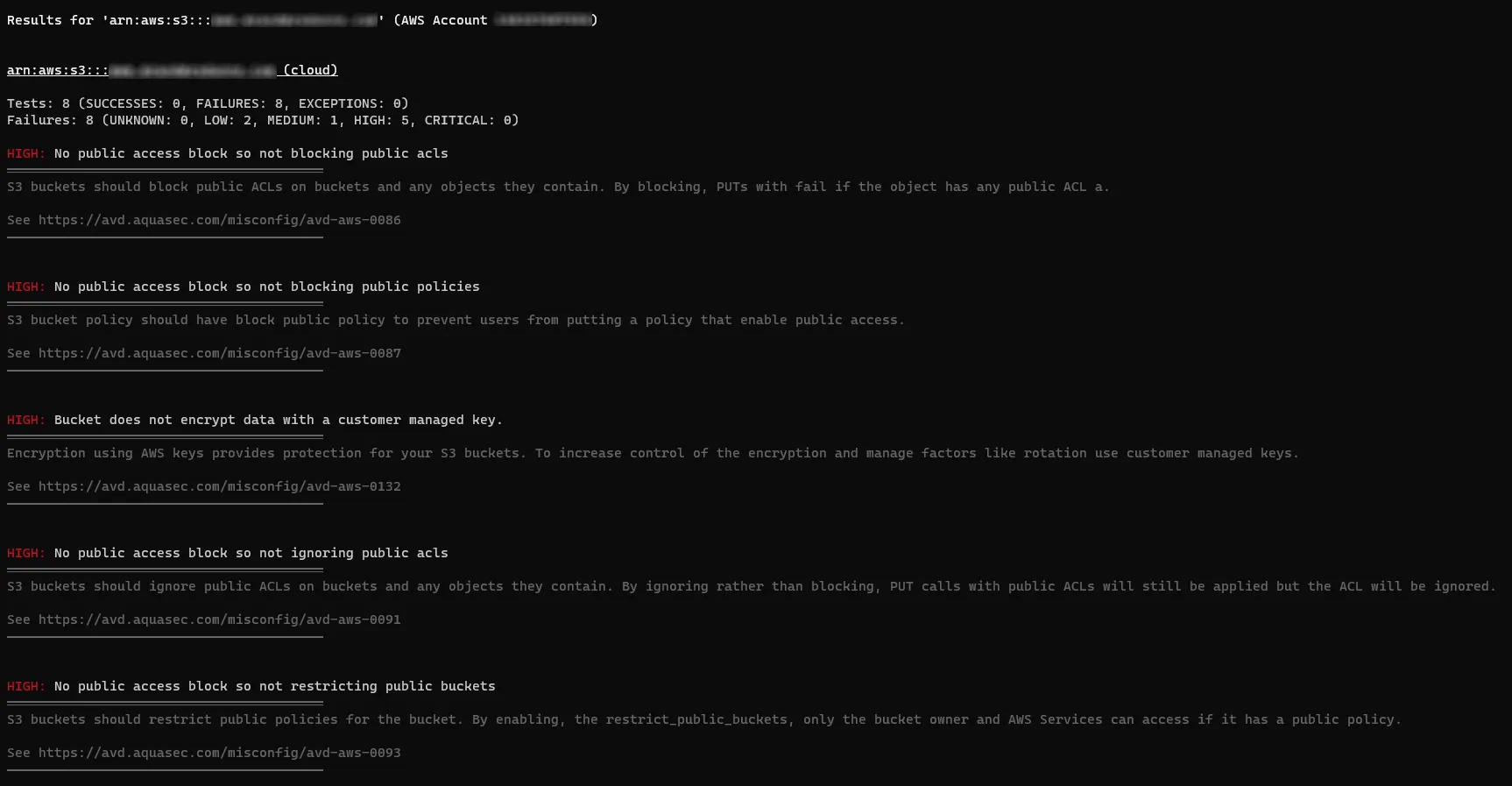
As we can see this particular resource has a lot of security misconfigurations, we can now focus on mitigating any risk by remediating the highlighted issues. Each finding links to an entry in the Aqua vulnerability database, which provides a more robust explanation alongside code examples for CloudFormation and Terraform.
Use cases
Trivy for AWS, along with the other scan options, can be utilised within CI/CD pipelines to capture misconfigurations before deployment to a production environment. If you are using GitHub Actions there is an Aqua Trivy Action to make it easy to run scans within your pipelines against your cloud infrastructure: https://github.com/aquasecurity/trivy-action
You can direct Trivy to scan multiple accounts, services, and ARN’s across your whole estate, and output the results as JSON to be fed into a custom web application or an existing enterprise security platform to track, monitor, and alert on the results.
Limitations
At the time of writing there doesn’t appear to be a way to customise the rules, this would be beneficial to hide findings that might be out of scope or where a team has decided to accept the risk. This could also be leveraged to introduce custom rules for findings that may be important to individual customers outside of the AWS CIS 1.2 framework.
In its current format it may be difficult to run Trivy for AWS in a well established pipeline as it would be too restrictive, although it’s still beneficial to have in the toolbox for manual testing in more complex situations.
Useful resources
- Repository: https://github.com/aquasecurity/trivy
- Documentation: https://aquasecurity.github.io/trivy
- Walk-through Video: https://www.youtube.com/watch?v=XGfr-9CawV0
- AWS CIS 1.2: https://docs.aws.amazon.com/securityhub/latest/userguide/cis-aws-foundations-benchmark.html